
An import can fail even with a longer request timeout. The browser can disconnect, a proxy can time out, or a worker can restart after committing some rows. Large exports run into a similar problem: generating the file may take longer than a normal API request should stay open.
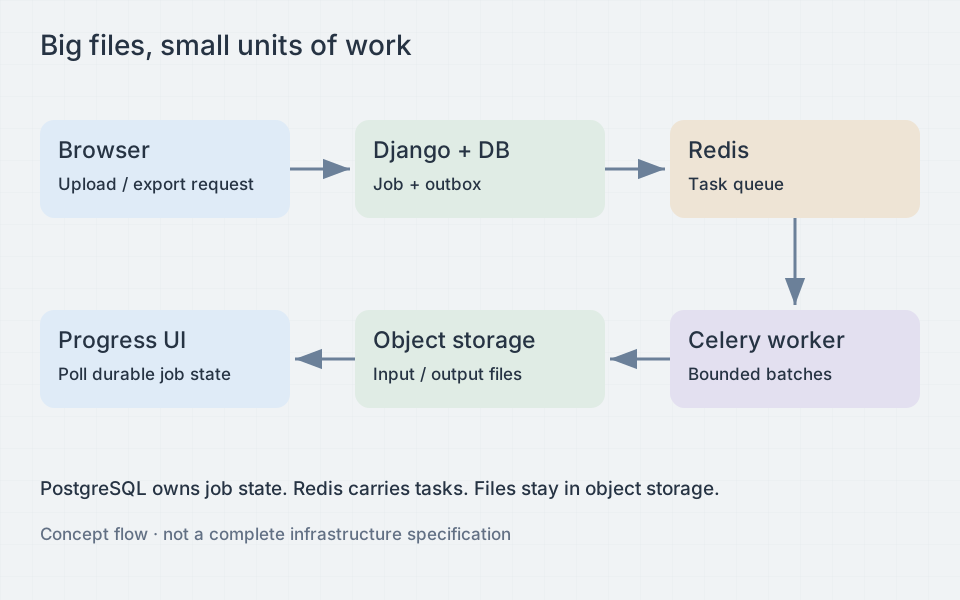
In this design, Django authorizes requests and creates durable jobs. Object storage holds the input and output files, Celery runs the work, and Redis is the task broker. PostgreSQL stores the authoritative job record. A task ID or Redis result entry alone cannot provide an audit trail that survives broker data expiry or infrastructure replacement.
Separate upload, acceptance, and execution
Create an import job with an owner, tenant, operation type, schema version, and idempotency key. Issue a short-lived upload authorization for a server-selected object key. Do not let a client choose another tenant’s prefix. Where supported, constrain content length and type in the upload policy, then verify actual object metadata and file content before processing.
After upload, a completion endpoint checks object ownership, size, checksum where available, and allowed format. Pin the object version or move it to an immutable processing key so a repeated upload cannot change the input mid-job. Check the file content rather than trusting its extension. Limit decompressed size for archives and reject unsupported encodings explicitly.
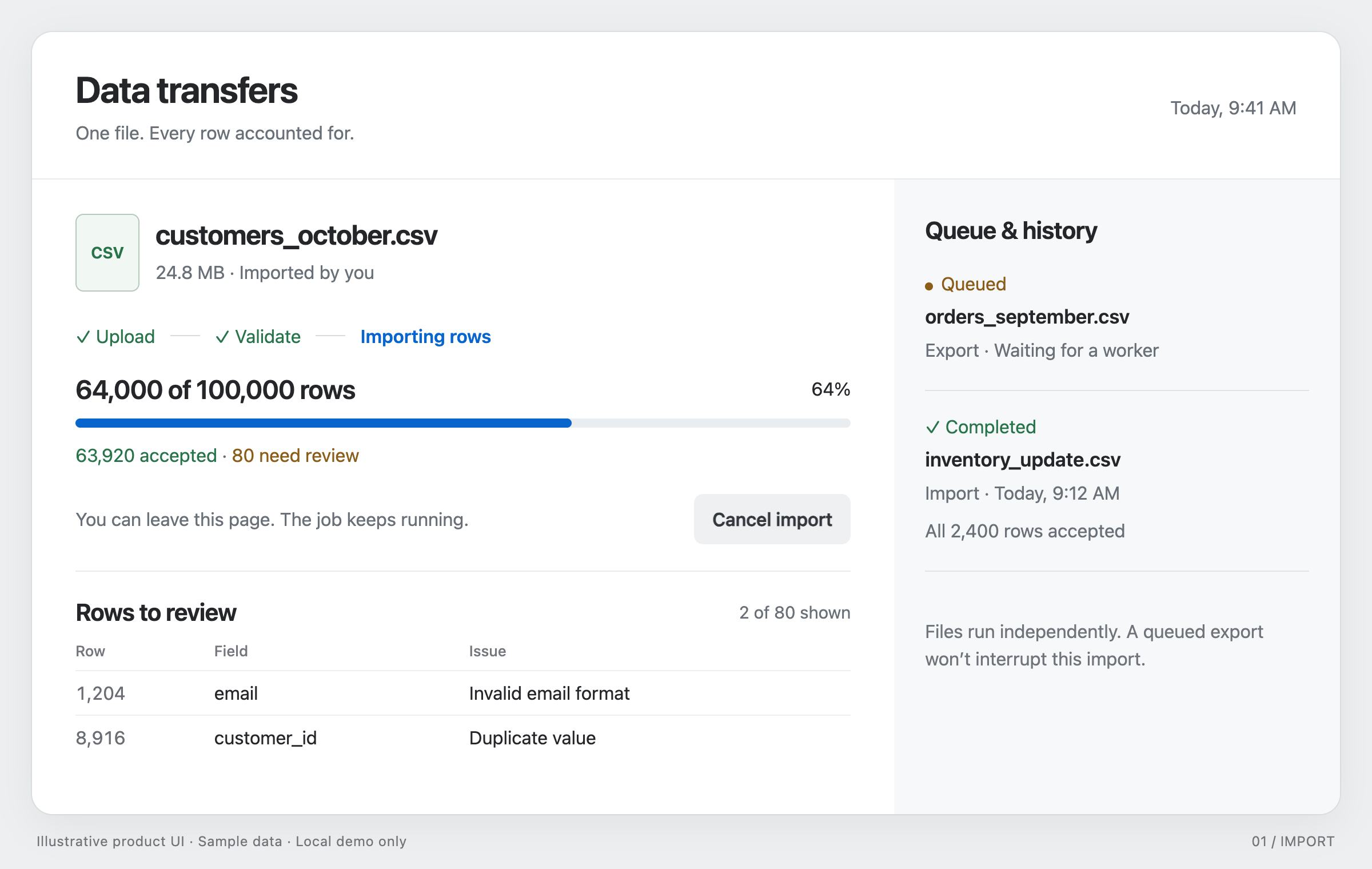
Return 202 Accepted with a job resource URL after accepting the job. The durable state might move through uploading, queued, validating, processing, finalizing, and a terminal state such as succeeded, failed, or cancelled. Record timestamps, counters, error summaries, output keys, and a cancellation request separately from the current stage.
Close the database-to-broker gap
Calling a task before committing its job row allows a fast worker to see missing data. Django’s transaction.on_commit avoids that ordering bug, but it does not make the commit and broker publication atomic. A process can die after committing the database and before publishing the message.
For reliable dispatch, insert an outbox row in the same transaction as the job. A dispatcher publishes pending outbox entries and marks them sent. If it dies after publication but before marking, it may publish twice. Consumers must therefore tolerate duplicate delivery. A reconciler can also detect queued jobs that have not started and retry dispatch.
Configure Redis persistence, eviction policy, and Celery’s visibility timeout for the workload. A visibility timeout shorter than a long-running task can cause redelivery. Use late acknowledgement only when task effects are idempotent, since it does not guarantee exactly-once execution.
Make committed rows safe to repeat
Use the job ID and source row number to identify each imported row on retry. A separate tenant-scoped business key determines whether to create a record, update it, or report a conflict with existing data. Define the update policy before writing an upsert. An idempotent upsert can still overwrite someone else’s recent edits without warning.
The following sketch assumes a unique constraint on (job_id, row_number) and runs inside a bounded batch transaction:
from django.db import transaction

@transaction.atomic
def apply_batch(job_id, rows):
    job = ImportJob.objects.select_for_update().get(pk=job_id)
    if job.cancel_requested or job.status != "processing":
        return False

    for row_number, payload in rows:
        receipt, created = ImportReceipt.objects.get_or_create(
            job_id=job_id,
            row_number=row_number,
        )
        if not created:
            continue
        # validate_row returns expected validation errors as data.
        clean, error = validate_row(payload)
        if error:
            receipt.error_code = error.code
            job.rejected_rows += 1
        else:
            upsert_record(tenant_id=job.tenant_id, data=clean)
            job.accepted_rows += 1
        receipt.save()
        job.processed_rows += 1
    job.save()
    return True
The model names and helper functions are application-specific. The receipt, domain write, and counters commit together. An unexpected database error rolls back the batch so retry cannot leave a receipt for an unapplied row. Expected database constraint failures need a nested savepoint before recording an error; catching an integrity error inside the outer transaction and continuing leaves that transaction unusable.
Holding the job lock serializes duplicate workers for this job. Keep batches short so cancellation can acquire the same lock. For parallel partitions, use separate partition checkpoints and carefully defined counter updates instead of turning one job row into a bottleneck. Side effects such as email need their own outbox and deduplication keys.
Stream bytes and bound memory
Read input through a streaming text wrapper and a CSV parser that handles quoted fields, including fields containing newlines. Splitting the input on line breaks will misread those fields. Process a bounded batch and discard it after commit. Avoid building a list of every row or loading an entire workbook into memory. Spreadsheet formats require format-specific streaming libraries and limits on sheets, cells, and expansion.
For export, iterate a queryset with explicit ordering and selected columns, or use keyset batches. Write CSV incrementally to multipart object storage or a quota-limited temporary file, then upload. Do not concatenate the entire export in a Python string. Abort unfinished multipart uploads and clean temporary files after failure.
Decide how the export should handle records edited while it runs. Keyset pagination avoids offset drift, but values can still change between batches. A repeatable-read snapshot gives a consistent view at the cost of a long database transaction. Materializing selected IDs fixes which records appear in the export; their values can still change. Document the chosen behavior and impose duration limits.
Handle errors, retries, and cancellation
Store row-level errors with source row number, field, and a stable error code. Keep sensitive raw values out of logs. Put a bounded sample in the job response and a complete error report in protected storage with a retention policy. State whether valid rows remain committed when other rows fail; all-or-nothing imports usually need staging tables and a separate publish transaction.
Retry transient network errors and deadlocks with bounded exponential backoff and jitter. Do not retry malformed CSV forever. A user-requested retry can reuse the existing job checkpoints or create a new job with explicit semantics. Reusing an idempotency key with different input must return a conflict, not another user’s previous result.
Cancellation should set a durable flag. Check it between batches and before publication. Already committed rows remain unless the application implements compensating actions. Do not describe a cancellation request as completed while the worker is still finishing its batch. Use row locking or conditional state updates so cancellation and success cannot both win the final transition.
Authorize downloads and report progress
Every status, cancellation, retry, and download endpoint needs tenant and user authorization. Recheck relevant permissions when work starts and when output is requested. Return short-lived signed download URLs only after authorization. Treat those URLs as bearer credentials: avoid logging them, keep buckets private, and expire stored artifacts separately from URL expiry.
CSV quoting does not prevent spreadsheet formula injection. For text destined for spreadsheet users, detect formula-leading characters such as =, +, -, and @, including suspicious leading whitespace or control characters, and apply a documented escape policy. A leading apostrophe is common but changes the data and is not a universal guarantee across spreadsheet tools. Prefer explicit text cells in a spreadsheet export when fidelity matters; test supported readers and keep machine-readable exports distinct.
When total work is unknown, show a status such as “Validating file,” “Processed 18,200 rows,” or “Preparing download.” Only show a percentage when the total for that stage is known, and report upload progress separately from import progress. Poll with backoff, pause polling in hidden tabs, and resume from the job URL after refresh. Mark success only after the final object exists and its key is committed.
Test what happens when a worker stops mid-batch, a message arrives twice, or a download URL expires. Also test cancellation races and restoring the job database before relying on the workflow.