
A small React and Django application can start with a private S3 bucket behind CloudFront for frontend assets and one small EC2 instance running a reverse proxy, Django, a Celery worker, and Redis. PostgreSQL can run on that instance too, if that meets the application’s recovery requirements.
Whether this setup is the cheapest option depends on region, traffic, storage, public IPv4, backups, and the time spent operating it. Before choosing services, decide how long the application can be unavailable and how much data it can afford to lose.
Sharing one EC2 instance
Running the API, worker, broker, and database together reduces the number of services to manage, but they all share the same resources. A large import can exhaust memory and take down normal requests. A full disk can stop PostgreSQL and Redis at once. If the instance type uses CPU credits, monitor those alongside CPU utilization.
Set process memory limits, start worker concurrency conservatively, and reserve resources for PostgreSQL. Bind PostgreSQL and Redis to private interfaces or localhost; neither belongs on the public internet. Terminate TLS at the proxy, restrict inbound ports, and use Systems Manager where practical instead of leaving SSH broadly accessible.
RDS handles database patching, backup tooling, and some recovery work for you. Its availability features depend on the configuration, so check whether that includes multi-zone failover. RDS costs more than running PostgreSQL on an existing machine, though it may cost less than maintaining recovery procedures yourself. With either option, keep backups off the instance and test a restore.
Treat the monorepo as a dependency graph
A directory filter alone misses shared changes. Editing a root lockfile may alter frontend dependencies without touching the frontend directory. A generated API client can change when a Django schema changes. A shared Dockerfile or deployment script can affect both applications.
Write down dependency rules before optimizing builds:
apps/web/**                  -> frontend
apps/api/**                  -> backend
packages/contracts/**        -> frontend + backend
pnpm-lock.yaml               -> frontend
pyproject.toml, uv.lock       -> backend
.github/workflows/**         -> frontend + backend
infra/**, scripts/release/**  -> frontend + backend
These are example dependency rules; you’ll need to adapt them to your project’s CI configuration. Include any other build inputs shared by Python and JavaScript. When a change’s impact is unclear, run the build to avoid deploying stale output.
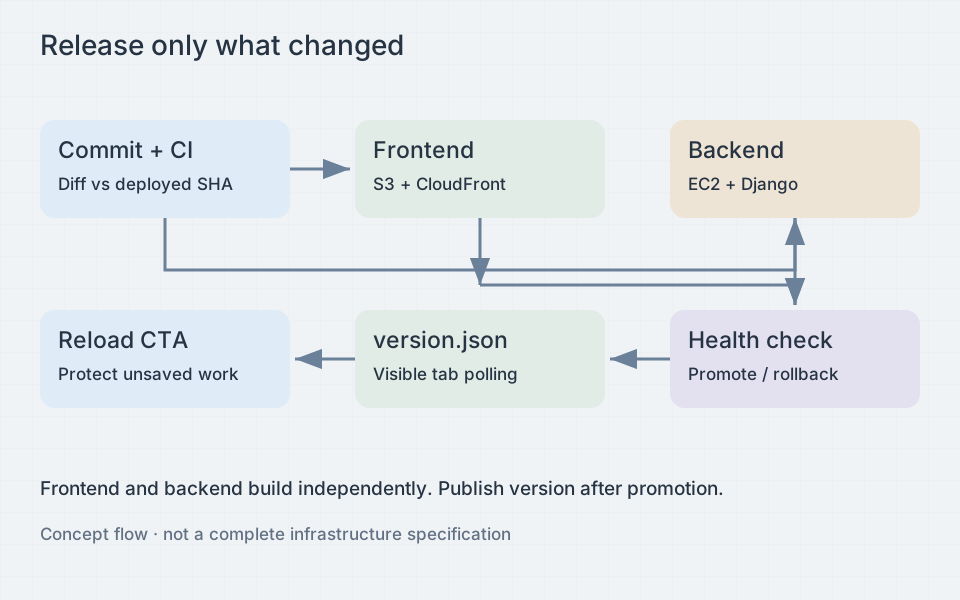
Pull requests can compare against their merge base. Production deployment needs comparison with the last successfully deployed commit for each component, not merely the previous commit on the branch. Otherwise a failed deployment followed by an unrelated change can skip the component that still needs shipping. Build everything when the base revision is missing or history is shallow. Always run a lightweight CI gate so skipped component jobs do not leave required checks unresolved.
Limit CI credentials
Use GitHub Actions OIDC to assume an AWS role instead of storing a long-lived AWS access key. The role trust policy must restrict both the audience and the subject to the intended repository and protected deployment environment. A production environment also provides a place for approval rules.
permissions:
  contents: read
  id-token: write

concurrency:
  group: production-release
  cancel-in-progress: false
This fragment enables token issuance; it does not grant AWS permissions by itself. Scope the AWS role to the frontend bucket prefixes, deployment artifacts, and specific instance or deployment mechanism it needs. Keep database secrets out of frontend build variables. Pin third-party actions to reviewed commit SHAs, and do not run untrusted pull-request code inside a privileged deployment job.
Run promotions one at a time and check that the currently deployed release is the expected predecessor before switching traffic. Two jobs can finish building out of order even if their deployment steps share a lock.
Deploy versioned artifacts
Build each release once and give it an immutable identifier, usually the commit SHA. Store the backend artifact and its dependency manifest under that identifier. On EC2, unpack into a new release directory rather than copying over the running application.
Run configuration checks, prepare static files, and start the new application on an unused local port. Check readiness through that process, including a lightweight database query. Then replace the reverse proxy’s upstream configuration atomically, validate it, and reload the proxy. Keep the old process briefly available to drain requests. An atomic symlink switch can select a release directory, but it does not restart a process or provide zero downtime by itself.
For the frontend, upload content-hashed assets first and keep assets from previous releases. Publish the HTML entry document only after all referenced files exist. Give hashed assets long immutable caching, while HTML and the version manifest must revalidate. Check that CloudFront honors those policies: a positive minimum TTL can override the origin’s no-cache header. As caches update, browsers may see the new release at different times.
Database migrations can make rollback difficult. Start by adding nullable columns or new tables, then deploy code compatible with both schemas. Backfill separately and remove obsolete fields in a later release. Run migrations once under a deployment lock and check lock duration on realistic data. Rolling application code back does not reverse a destructive migration or restore deleted data.
Tell open tabs about new code
Interactive demo — this page will not reload.
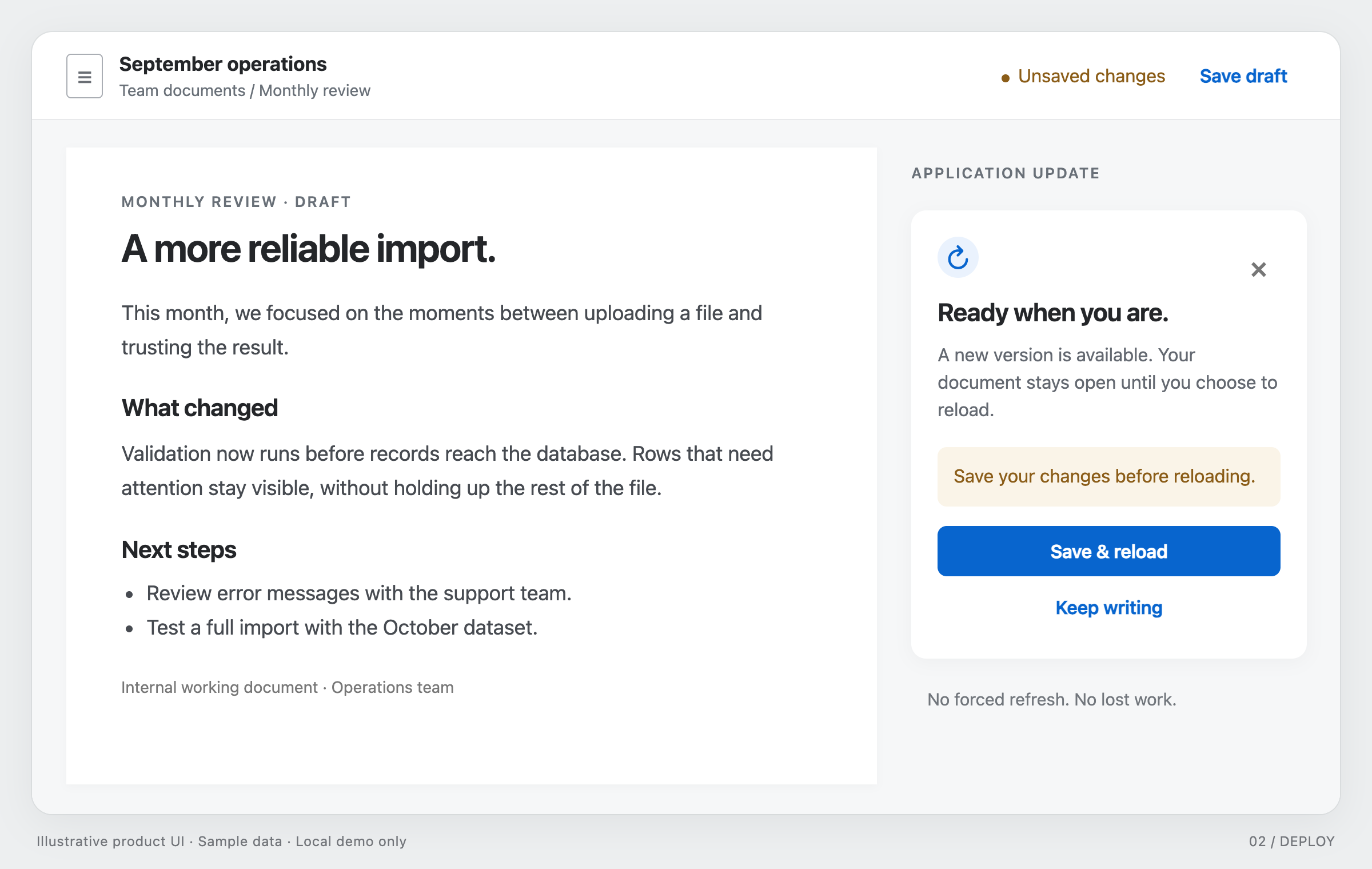
A new version is available. Update when you’re ready.
An open tab keeps running its original JavaScript. Publish a small version manifest last, after frontend promotion, and poll only when the page is visible and the browser appears online. The online flag is a hint; requests can still fail.
export function watchVersion(currentVersion, showUpdate) {
  let stopped = false;
  let pending = false;
  const controller = new AbortController();

  async function check() {
    if (stopped || pending || document.hidden || !navigator.onLine) return;
    pending = true;
    try {
      const response = await fetch('/version.json', {
        cache: 'no-store', signal: controller.signal,
      });
      if (!response.ok) return;
      const next = await response.json();
      if (!stopped && typeof next.version === 'string' &&
          next.version !== currentVersion) showUpdate(next.version);
    } catch {
      // A missed check must not interrupt ongoing work.
    } finally {
      pending = false;
    }
  }

  const timer = setInterval(check, 60000);
  document.addEventListener('visibilitychange', check);
  window.addEventListener('online', check);
  check();
  return () => {
    stopped = true;
    controller.abort();
    clearInterval(timer);
    document.removeEventListener('visibilitychange', check);
    window.removeEventListener('online', check);
  };
}
The callback should show an “Update available” action that the user can dismiss. It must not reload the page immediately. When someone clicks it, check for unsaved form changes, uploads, and pending mutations. Offer to save a draft or stay on the page, and reload only after explicit confirmation or safe completion. Stored drafts need a versioned format so newer code can read them. If you use a service worker, coordinate its update lifecycle too.
Once the upload succeeds, verify the deployment with an authenticated API request, a queued task, an old browser tab, and a rollback to the previous artifact. Record the deployed versions.